
Why email is still the weakest link in data protection

Human-error data breaches surge and email mistakes top the list
Every time a personal data breach results from a mistake with email, the ICO is at pains to urge organisations to do more to prevent errors. We’ve been warned repeatedly, yet it keeps happening, and the scale reportedly getting worse.
Between 2020 and 2025, the number of personal data breaches caused by human error rose by a staggering 43%. This stark picture comes from cyber security company Bridewell, which analysed ICO data and found the top five types of human-related incident are:
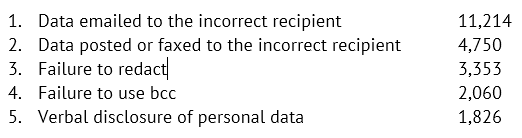
Notably, two of the five involve email. The top one, emailing the incorrect recipient, accounts for almost as many breaches as the other four put together. And when the email contents or an attachment contains sensitive information, the consequences can be serious.
I suspect nearly all of us have sent an email to the wrong person at some point or forgotten to use bcc when necessary to protect the identity of others. Even when there’s no personal data involved, these mistakes can be downright awkward, especially if commercially sensitive information is involved.
Often, it’s put down as “just one of those things”. But what might have been minor this time and easily resolved, may be more significant next time. It seems many organisations still haven’t fully recognised the scale of the risk.
It doesn’t matter how much training and raising of awareness you do, people will always make mistakes when they’re overworked, dashing off on holiday or distracted by personal issues.
There are technical steps which can make these mistakes less likely. Here are a few suggestions:
⏹ Disable or restrict autofill: Autofill is a handy way to quickly go through our address book and predict who we want to email. But it sometimes chooses the wrong person and we don’t notice until it’s too late. While disabling this can be a little annoying, it means mistakes are less likely.
⏹ Share sensitive information a different way: Encourage staff to use protected OneDrive/ SharePoint folders to share sensitive information, rather than using email. Just be sure sharing access permissions are set correctly.
⏹ Attachments: Use encryption or a complex password to restrict access to an attachment containing sensitive data and share the password by text or WhatsApp i.e. don’t use the same email account.
⏹ Encrypted file transfer service: some file transfer tools are free for individual sends, such as WeSendit.
⏹ Detect personal data: Use software which can automatically detect personal data in attachments or email content. You can set defaults to prevent it being sent or prompt users to add file protection (e.g. a complex password sent separately).
⏹ External recipients: Implement user prompts for attachments to external email recipients e.g. ‘Are you sure you want to send this externally?’ Albeit, these could soon become tiresome.
⏹ Multiple recipients: For teams who routinely send emails using BCC (e.g. regular updates / newsletters), use an email service provider.
⏹ Distribution lists: Keep group lists up to date, limit who can send to large lists, and make sure similarly named lists can’t easily be confused.
⏹ Delay on send: How often do you spot an error just after you’ve sent an email? Setting up a 10 second delay on send for your staff, gives people a chance to correct their mistakes.
⏹ ‘Reply to All’: Set an alert if people are about to reply to all, prompting them to check whether this is appropriate.
⏹ Revoke access after sending: While the standard Outlook ‘recall’ feature is unreliable, especially for external recipients, some more advanced email security solutions give you the ability to recall or revoke access to an email and its attachments (even after it hits the recipient’s inbox).
It’s always worth checking what controls are available on your email system or looking at additional software solutions. Some of the prompts mentioned above are available using Outlook’s MailTips.
Of course training, continually raising awareness and providing clear email rules all play their part, but technical measures are more likely to prevent an absentminded mistake.
Ultimately, errors are inevitable. What isn’t inevitable, though, is the impact mistakes have once the ‘send’ button’s been hit. Every little step taken to mitigate email errors lessens the impact when one inevitably slips through the net.
For more information the ICO has published email security guidance.